FRCM Release 3.0.0 & 3.1.0 – Release Notes
Last updated: March 13, 2026
Product: First Rule Contract Manager
Version: 3.0.0 & 3.1.0
Internal Production Release Date: March 13th, 2026
External Release Date: March 13th, 2026
🧱 Overview
First Rule Contract Manager (FRCM) Release 3.0.0 introduces major enhancements focused on supporting projects during the active Construction phase, expanding reporting capabilities for Accounting users, and delivering a powerful new document comparison tool.
🚀 Feature Enhancements
1. Construction Home Page
A new Construction stage has been added to the FRCM Project Process Flow to support projects as they move into active build.
Projects can only move into Construction once the primary contract is in Executed status.
If the primary contract is not executed, the system will prompt users to update the status before proceeding.
Once a project enters the Construction stage:
Users can interrogate all processed contract documents associated with the project.
High-level project information is centralized in one place.
A contract sub-grid allows users to view existing contracts and create new contracts directly.
Users have access to First Rule Contract Training videos.
Previous stages can no longer be reactivated, preserving project flow integrity.
2. Account Updates
Enhancements have been made to better support subcontractor management.
A new Trade Type (NAICS) field is now available for Subcontractor accounts.
This field appears automatically when Subcontractor is selected as the Account Type.
New saved views have been added within the Accounts module:
Views by Account Type
Views for accounts with a defined Trade Type
3. Accounting Summary Report
Accounting persona users can now generate a new report within FRCM once their document has been uploaded and processed by our AI Assistant, Marten.
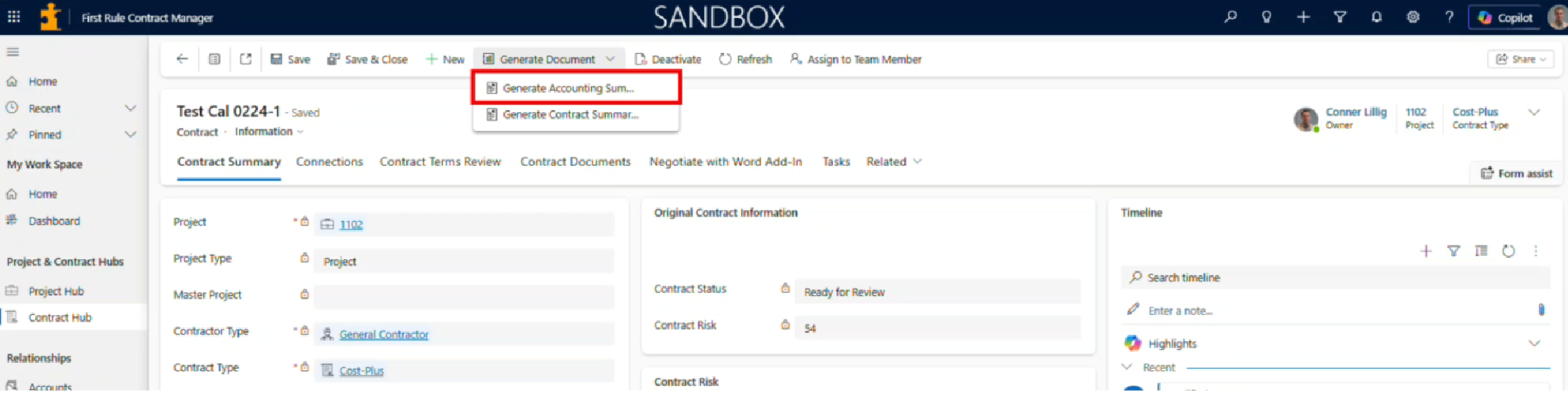
After the report is generated by the user:
The report downloads directly to your computer.
A copy is saved to SharePoint under the Contract Documents tab.

4. New Comparison Feature
Users can now compare two PDF documents directly within the Contract Documents tab in FRCM.

To use this feature:
Select two PDF files from the Contract Documents tab.
If needed, upload documents directly within the tab.
Click Compare.
The FRCM Semantic Comparison window will open, displaying a side-by-side comparison with highlighted changes shown on the right-hand side.
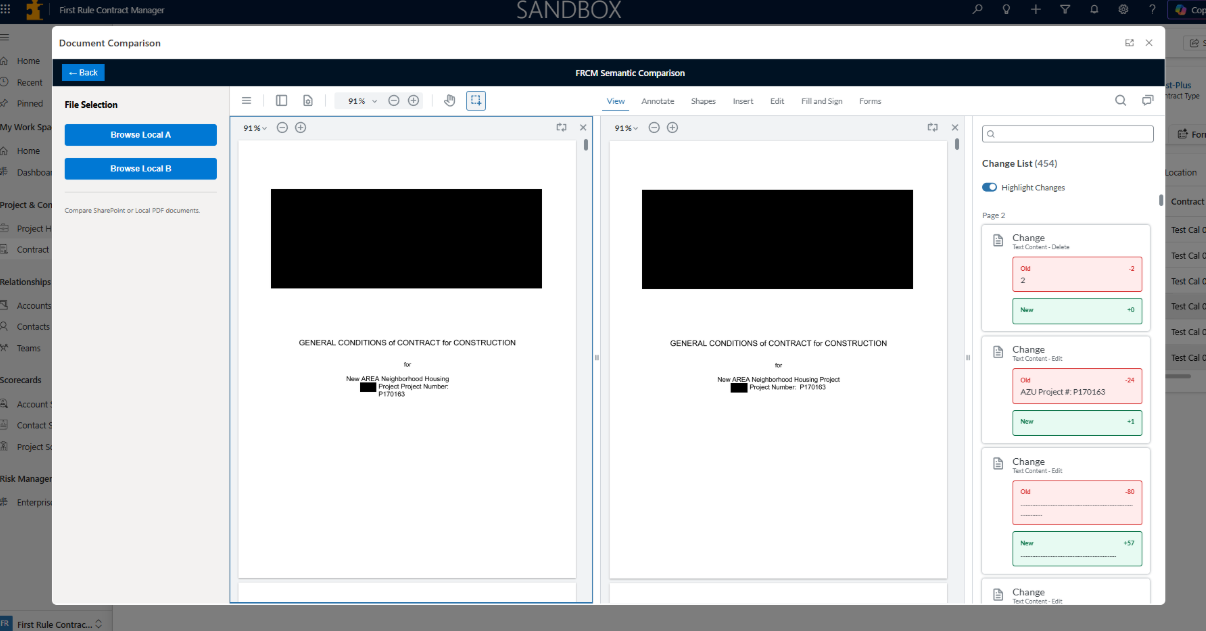
Users may also substitute one or both selected documents with files from their local computer (available under File Selection on the left side).
Please Note
If documents take longer than expected to load, perform a hard refresh (Ctrl + Shift + R) and run the comparison again.
Comparison accuracy depends heavily on document quality. Poorly formatted or scanned PDFs may produce less accurate results.
Project Manager Summary Report
Users can now generate a new report specific to a Project Manager persona in FRCM once their document has been uploaded and processed by our AI Assistant, Marten.
After the report is generated by the user, it will:
Download to your computer
Save to the SharePoint location under the Contract Documents tab
Known Issue
Users may be able to generate a report before processing has completed. When this occurs, the report may display N/A values instead of the expected responses. After a contract processing has finished, please allow a few minutes for report processing to be completed before generating a report to ensure responses are included.
⚙ Enhancements
Removed legacy nomenclature from the Active Contract Terms Risks settings table.
Made Risk Rating Weight a required field across all Project Risk Configuration values.
Removed Address 1: City as a default column in the Account entity.
Hid legacy views in the Account entity to simplify navigation.
Hid the External Contract Parties tab from the default tab set within a Contract record.
Modernized the Contract Upload user interface and updated status messaging.
Added a retry mechanism when a contract file fails to upload to SharePoint during initial upload.
Reformatted Contract form fields when a Project is in Contract Execution.
Report generation is now available for Contract in statuses beyond Ready for Review
Executable Documents are now reuploaded to Marten after generation, allowing analysis of the most up-to-date version.
Updated Executable Contract statuses to reflect the reupload status to Marten following executable document generation
Deprecated the Scan Business Card feature from the Quick Create Contact form
🐞 Bug Fixes
Fixed AI response formatting issues
Resolved an issue where the old document viewer panel appeared when file names contained special characters
Addressed home page regression issues to improve stability and load performance
Fixed an issue where the deprecated side panel enabled when file names contained special characters (e.g., “&”)
Resolved report generation issues
Corrected layout issues in the homepage Task section
Updated placement of the Project dropdown in the Project Composite Risk Snapshot section on the homepage
Resolved an issue where users were not prompted to move Contracts to Contract Executed when advancing a Project to Construction
Resolved an issue where Contract Term Executive Summaries were not generating in the Word Add-in.
Fixed issue with headings in Project Manager Report template