Feature Spotlight: Scorecards
Last updated: June 10, 2025
This guide provides a straightforward approach to accessing Project Scorecards making it easy for users to navigate the platform and find key project metrics. By following the steps outlined, users can efficiently monitor project performance, enhancing decision-making and strategic planning.
Locate and click the "Project Scorecards" button the left side of the dashboard.

Scroll to any project you'd like to open up and view.
The Project Scorecard provides a high-level overview of the project, offering key insights at a glance. It displays the overall rating of the project, along with the associated account. This screen serves as a macro-scale view, capturing the critical project details and highlighting immediate qualities that may impact decision-making. It’s designed to give you a clear, quick assessment of the project’s status, helping you stay informed and proactive.
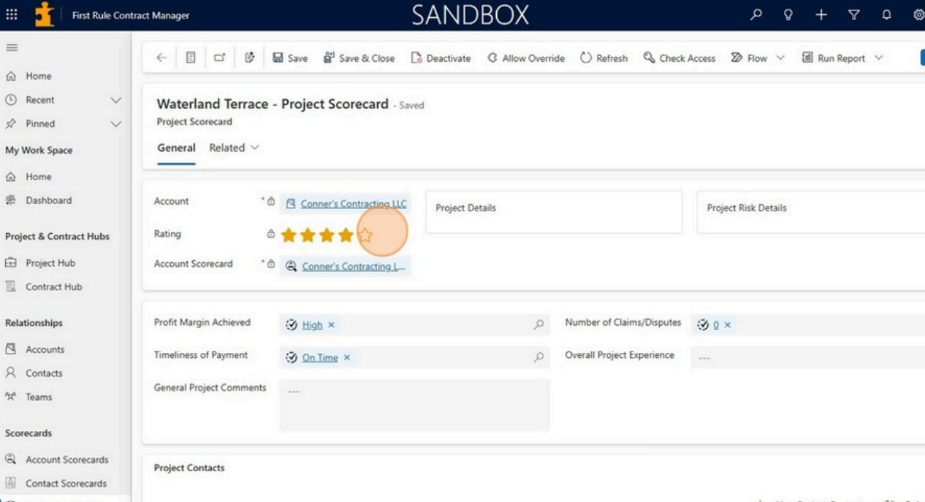
You are then able to click the Account Scorecard that is associated with the specific project.

The Account Scorecard offers a deeper dive into an account’s overall standing, focusing on the more personalized aspects of your relationship. This screen provides a detailed evaluation of the account, highlighting key factors that influence engagement, trust, and risk. It’s designed to give you a comprehensive view, helping you track account performance and make informed decisions based on your unique interactions.
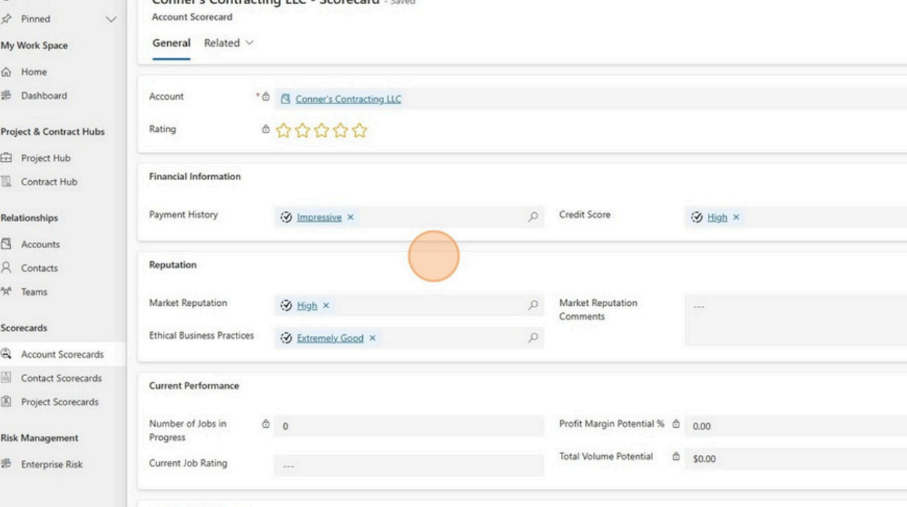
You can then scroll down and select the associated Contact with this account and get even more granular into the relationship.

The Contact Scorecard allows you to dive even deeper by evaluating a specific individual within an account. This screen provides a detailed snapshot of that person’s engagement, history, and key attributes, helping you better understand their role and impact within the project. It’s powerful tool for tracking relationships and making more informed, strategic decisions.
